August 2023 Bits#
August 3 - Grafana 10 and the Infinity Datasource#
Yesterday I installed Grafana 10 on my own server, hoping to understand it better before upgrading the Wild Mountain Farms Grafana to that. Fifeman GraphQL Datasource has served me well, but it’s not maintained anymore. I came across the Infinity Datasource recently, and it seems to do everything I need and more. And even better, it’s maintained (last commit 10 hours ago as I write this)! I got it up and working like so:
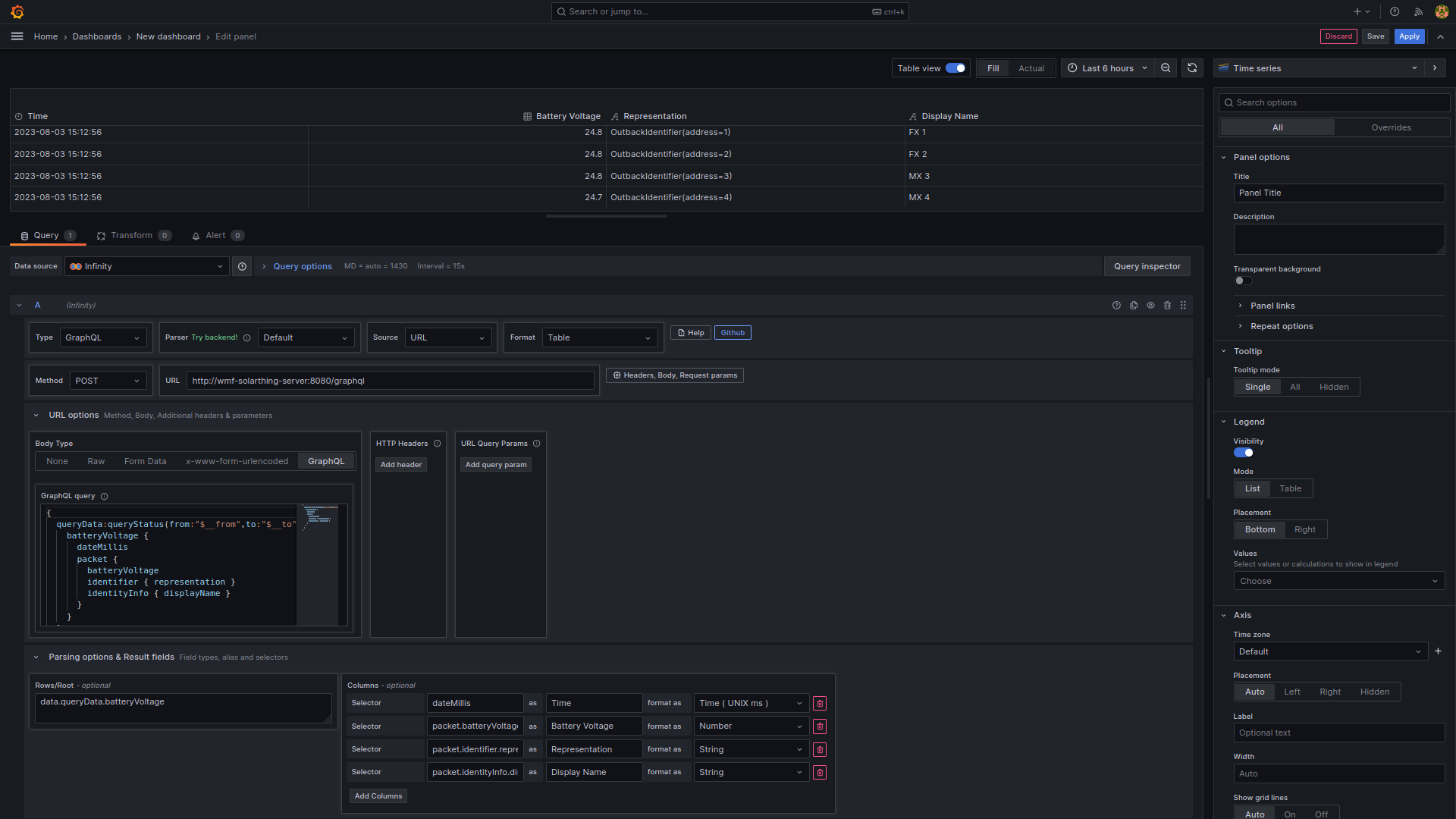
Now I just have to figure how to use Grafana’s Group By feature, since (unlike GraphQL Datasource), Infinity does not support Group By natively.
(Update August 4). Alright so I played with it a bit… and… yeah I can’t seem to figure out how the fuck it’s supposed to work. But luckily, the plugin itself supports UQL (Unstructured Query Language), which is a project that is way too cool looking to only have 5 stars (okay 6 now that I starred it). It even has some great docs (on the Infinity’s plugin docs). It’s made by the same person! Alright, it seems really cool, but I don’t think it can convince Grafana to make it into separate series. Maybe there’s something I’m missing. Changing the parser to “Backend” is interesting, but I can’t seem to get its summarize/summarize by to work (And I don’t really know how to use them). There’s also the GROQ option, but I suspect that I’ll run into the same problem, It has a nice cheat sheet and it has a cool GROQ Arcade. Looking at the documentation, GROQ seems extremely powerful for altering JSON data, but I don’t think it’ll work.
(Update August 5) I ended up spending a lot of time looking into GROQ anyway. I had problems trying to search the documentation and tutorials for dealing with nested JSON. I even ran across this tutorial and I couldn’t even get its example to work in GROQ Arcade.
I just looked into Grafana transformations a bit more and I was searching among transformations and finally found
the partition by values transformation.
It does exactly what I need!!
All I have to do is select “Representation” as the field to partition by and it works!
Now the labels on each line on the graph are called “Battery Voltage <device>”.
I can use a rename by regex transformation.
I set match to ^Battery Voltage (.*) and replace to $1.
August 10 - Making a Secure Docker Network#
My docker networking setup could definitely be improved. I want to eventually make it so containers can’t talk to each other, even if they know their IP.
For instance, let’s try this:
lavender@shork:~$ docker inspect -f '{{ .NetworkSettings.Networks.caddy_net.IPAddress }}' radarr
172.18.0.10
lavender@shork:~/programming/Other/server-config/configs/shork/services/transmission-openvpn$ docker exec -it wmf-grafana bash
root@87ac87a59c12:/usr/share/grafana# curl radarr:7878
...html content...
root@87ac87a59c12:/usr/share/grafana# curl 172.18.0.10:7878
...html content...
You can see that my wmf-grafana container can access my radarr container, which is not something I want.
Currently, everything that needs to be inside Caddy is on my caddy_net network.
Luckily, something like my duckdns container, which is not on any networks explicitly cannot access radarr via hostname or IP.
At first I thought something like an L3 IPvlan is what I needed, but now I’m starting to think that having a bunch of docker networks is the way to go. My Caddy container would be on all of these networks, while each of these services would have their own network to make sure certain services can access each other.
After some tinkering and getting everything on its own network, my caddy file now looks like this:
version: "3.7"
services:
  caddy:
    build:
      context: .
    container_name: caddy
    hostname: caddy
    restart: unless-stopped
    ports:
      - "80:80"
      - "443:443"
    networks:
      - caddy_net-transmission
      - caddy_net-stirling
      - caddy_net-mailu
      - caddy_net-foldingathome
      - caddy_net-gitea
      - caddy_net-homepage
      - caddy_net-immich
      - caddy_net-serge
      - caddy_net-trashcan
      - caddy_net-vaultwarden
      - caddy_net-wmf_solarthing
    env_file:
      - ../shared.env
    volumes:
      - ./Caddyfile:/etc/caddy/Caddyfile:ro
      - ./custom:/custom
      - /opt/containers/caddy/data:/data
      - /opt/containers/caddy/config:/config

networks:
  default:
    name: caddy_net
  caddy_net-transmission:
    external: true
  caddy_net-stirling:
    external: true
  caddy_net-mailu:
    external: true
  caddy_net-foldingathome:
    external: true
  caddy_net-gitea:
    external: true
  caddy_net-homepage:
    external: true
  caddy_net-immich:
    external: true
  caddy_net-serge:
    external: true
  caddy_net-trashcan:
    external: true
  caddy_net-vaultwarden:
    external: true
  caddy_net-wmf_solarthing:
    external: true
That’s a lot of networks!
August 12 - DietPi on RPi 2B r1.2#
I got 2 Raspberry Pi 2Bs, so now I gotta do something with em! I was able to identify that I have revision 1.2 (it says it on the board). This means that I should be able to use an image made for the ARMv8 processor. I’m going to do a DietPi install this time.
I logged in with root:dietpi.
I changed some passwords, disabled Serial/UART, choose the default options, and off it goes for installing a few things!
I used dietpi-config advanced options to change the hostname to charmander.
I got my DS18B20 temperature sensor wired up, but I had to swap the positive and negative wires from what the tutorials were telling me. Weird. At some point I’ll install SolarThing inside of docker, but for now this was a success!
August 12 - Using old DirecTV equipment#
I have some old DirecTV equipment laying around that I want to use. Apparently the “Connected Home Adapter” (DCAU1R0-01) I have can be used to send an Ethernet signal across coaxial calble. I honestly don’t remember what it was used for. We had a Genie (HR54-700), which maybe had “built in DECA”, but from the looks of it I think that model takes the satellite signal directly, rather than an Ethernet signal through its coaxial connection. So, maybe we have another one laying around, but I couldn’t find it, so we ordered another.
Upgrading Proxmox 7 to 8#
I’m going to do an upgrade to my Proxmox install. I’ll follow https://pve.proxmox.com/wiki/Upgrade_from_7_to_8. Main thing I’m focussing on is Known Upgrading Issues.
I believe I installed
pve-headers, and not anything likelinux-image-amd64. Plus, I didn’t install this on top of Debian.The next major release won’t support cgroup V1, which might affect me as some of my configs use
cgroupinstead ofcgroup2. I’ll ignore this for nowI’m not using a vGPU, so I don’t need to worry about NVIDIA vGPU Compatibility
So I should be good and safe from the known issues. And I think I meet all the prerequisites.
I’m not going to play it safe with backups, so hopefully everything is fine.
I have run a dist-upgrade on bigger-fish, so everything should be fully up to date.
If the bookworm non-free repository has NVIDIA driver updates, I expect shork’s NVIDIA driver to break, but that can be something I fix later.
A run of pve7to8 --full gave me only a single warning that I had containers/VMs running.
Good point, I will stop them all!
root@bigger-fish:~# pveversion
pve-manager/7.4-16/0f39f621 (running kernel: 5.15.107-2-pve)
Looks good, I shall continue!
It recommends to perform these via console or SSH (preferably console), but I’ll take my chances over SSH.
I can always get physical access if I need it.
I update /etc/apt/sources.list, but I have to update /etc/apt/sources.list.d/pve-no-subscription.list instead of the enterprise one like the tutorial says.
I don’t have the Ceph repository, so I skip that step.
Now it’s time for apt update.
Many, many packages are upgradable, including NVIDIA packages.
Let’s do it! apt dist-upgrade.
Things are going well.
I’m mostly accepting the package maintainer’s version of whatever, but for /etc/default/grub I made sure to keep my version.
I decline adding the enterprise repository, as I’ve already dealt with that.
And… Success! I think! Let’s restart this and see what breaks!
A CTRL+SHIFT+R in my browser gets everything working. My machines I have configured to start on boot have started, now I probably need to fix NVIDIA drivers.
Running nvidia-smi inside shork seems fine…
Heck, the output of nvidia-smi inside bigger-fish seems to show the same version.
Maybe it’s fine?
Yep! A stream shows Plex is hardware transcoding just fine!
2 hours later…
I now realize why the NVIDIA drivers did not get updated.
https://wiki.debian.org/NvidiaGraphicsDrivers#Debian_12_.22Bookworm.22
As you can see, I need to change my /etc/apt/sources.list to include the non-free-firmware repository.
I’m going to do this later, as I’ll need to do this on both bigger-fish and shork at the same time, for minimal GPU downtime.
August 14 - Fixing AdGuard Home LXC Out of Space#
Today my AdGuardHome LXC container ran out of space.
The /opt/AdGuardHome/data/querylog.json file was 1.1GB.
I increased the container’s storage to 3GB as a temporary solution, rebooted and it’s back up!
I now go to Settings > General Settings > Logs configuration > set Query logs rotation to 7 days and I now save and clear the query logs.
August 14 - Setting up apcupsd for my UPS#
I just got a 950VA UPS to connect to my server, bigger-fish. I’m going to try to install apcupsd directly on my host.
lsusb picks up my UPS as Bus 001 Device 012: ID 051d:0002 American Power Conversion Uninterruptible Power Supply.
Now I edit /etc/apcupsd/apcupsd.conf.
I’ll configure it as such:
UPSNAME undersea
UPSCABLE usb
UPSTYPE usb
# Commented out so that auto-detection is enabled for the usb type
#DEVICE /dev/ttyS0
# The default was 60, so I'll set it to 31 to use a little more CPU and also become a little offset from the top of each minute
POLLTIME 31
# The rest of the options below were left as default, but were still specified
LOCKFILE /var/lock
SCRIPTDIR /etc/apcupsd
PWRFAILDIR /etc/apcupsd
NOLOGINDIR /etc
ONBATTERYDELAY 6
BATTERYLEVEL 5
MINUTES 3
TIMEOUT 0
ANNOY 300
ANNOYDELAY 60
NOLOGON disable
KILLDELAY 0
NETSERVER on
NISIP 127.0.0.1
NISPORT 3551
EVENTSFILE /var/log/apcupsd.events
EVENTSFILEMAX 10
UPSCLASS standalone
UPSMODE disable
STATTIME 0
STATFILE /var/log/apcupsd.status
LOGSTATS off
DATATIME 0
# the rest is commented out
Now I set ISCONFIGURED=yes in /etc/default/apcupsd and then run systemctl start apcupsd.
It did not seem to work, as log messages say communication with UPS lost.
I comment out the DEVICE line (now reflected above), and I don’t get an error message anymore!
I think that’s a success, but let’s go and unplug the UPS to see if journalctl -u apcupsd will log any information.
And success!
Aug 14 16:27:22 bigger-fish apcupsd[64705]: apcupsd 3.14.14 (31 May 2016) debian startup succeeded
Aug 14 16:27:22 bigger-fish apcupsd[64705]: NIS server startup succeeded
Aug 14 16:27:22 bigger-fish systemd[1]: Started apcupsd.service - UPS power management daemon.

Broadcast message from root@bigger-fish (somewhere) (Mon Aug 14 16:55:09 2023):

Power failure on UPS undersea. Running on batteries.


Broadcast message from root@bigger-fish (somewhere) (Mon Aug 14 16:55:13 2023):

Power has returned on UPS undersea...